
A good service report includes the report number and date, customer and site details, the equipment serviced, the work performed, the materials used, labor time and travel, before and after photos, and the signatures of the technician and the customer. Below we go through each field and what to watch for, and you'll find a service report template at the end.
Sound familiar? You finished a job, you're proud of the result, and then, after you send the invoice, the customer calls upset: "That's not what happened." That's exactly what a service report is for. Fill it in while everything is still fresh: during the job or right after. The report you send reminds both you and the customer how the job went.
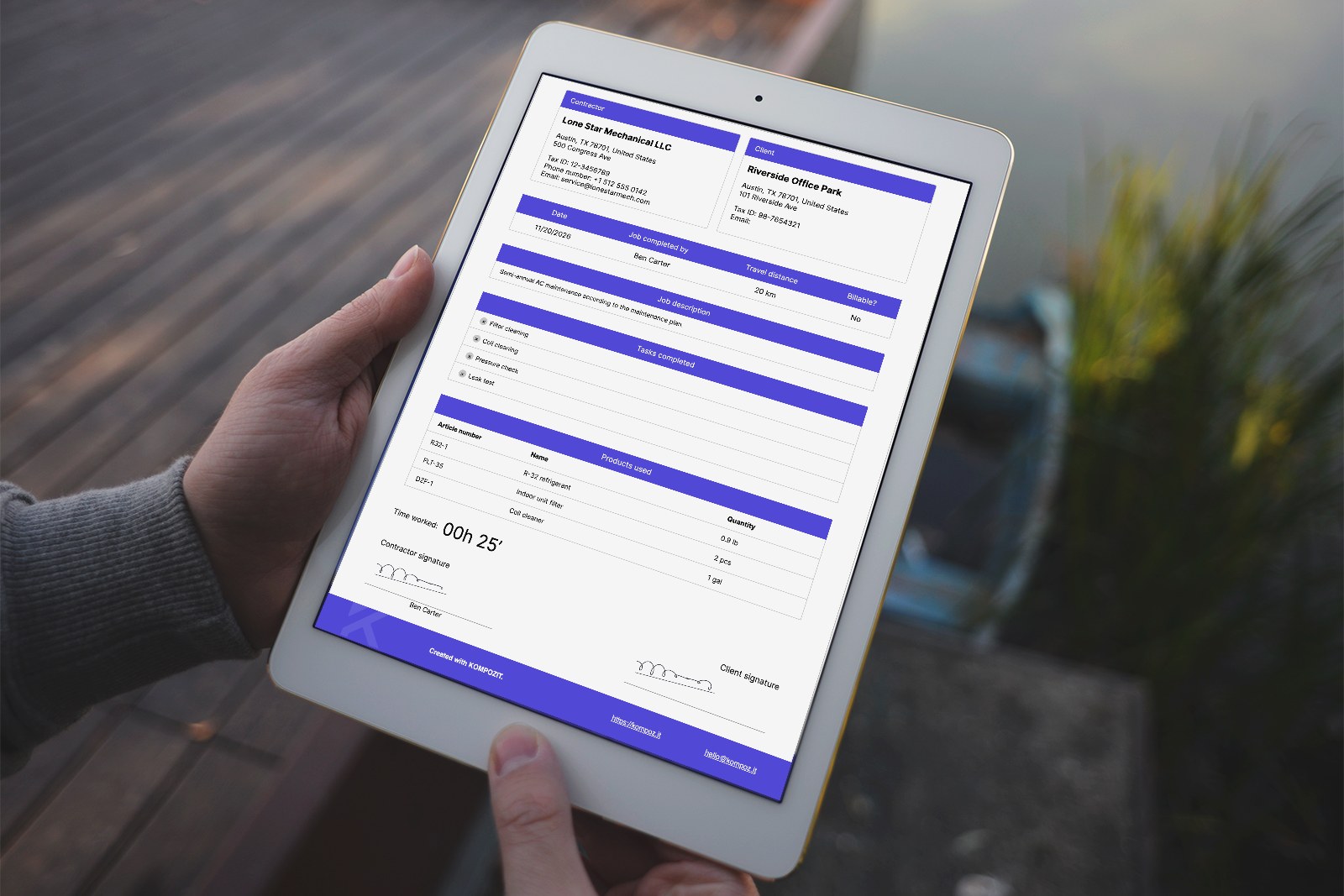
A service report is a document with the details of the job, signed by the customer at the end and kept on file by both parties.
Proof of work: if the customer disputes the job, the signed report is written proof of what you did and how.
Compliance: depending on your trade, you may need to document that the work meets technical or legal requirements. The service report records this in a detailed, consistent way.
A single source of truth: if everyone on the team uses the same service report, every job gets recorded the same way and in full.
Time tracking and billing: you can see who spent how much time on the job. That matters especially if you bill customers, staff or subcontractors by the hour, and it helps you estimate similar jobs in the future.
1. Number and date
A unique report number and the date of the job make every job easy to find later.
2. Contractor and customer details
Include your company details, phone number, website and email address: the service report is also a good marketing tool, because that's where the customer will look when they need you again or want to recommend you. Fill in the customer's name and the site address too, which helps with grouping and finding jobs.
3. The equipment serviced
If the job was done on a piece of equipment, record its model and serial number. That way its full service history can be traced, and at the next maintenance visit you can see what was done before.
4. Work performed
List every task and subtask as a checklist. The more detail you record, the harder it is to dispute the work later.
5. Materials and parts used
Record every material, part and consumable used, with quantity and unit.
6. Condition at handover
If the result of the work can be measured, write down the readings. For radiant floor heating, for example, the pressure test result proves there are no leaks; for a measuring instrument, the calibration values at handover show it was handed over in proper condition.
7. Photo documentation
Photos and videos are the strongest evidence. Before you start, photograph the site from all sides, and at the end take photos of the finished work, the installed materials and the condition at handover.
8. Labor time and travel
Record how much time each technician spent on the job and the travel distance or time, especially if you charge a trip fee.
9. Next steps
If another visit will be needed in the future, write it on the report so the customer isn't surprised.
10. Signatures
The service report is complete once it's signed. Record the full name and title of the technician who did the work and of the person accepting it for the customer, as well as the time of handover, so there's no argument later about who handed over and who accepted the work. If the customer wants to comment on the work, record that on the report too.

Remember: having everything on the report doesn't help if you don't explain to the customer what each field means. If they sign without reading, you may be covered legally, but reassuring the customer later will cost you extra trips.
Use the fields below as the basis for your own service report template.
| Field | What to enter | Example |
|---|---|---|
| Number, date | unique ID, date of the job | SR-2026-0142, November 18, 2026 |
| Contractor | company name, contact details, technician | Example Service LLC, technician Mike Johnson |
| Customer and site | name, address, contact person | Sample Corp., 1200 Main Street, Austin, TX 78701, Sarah Miller |
| Equipment | model, serial number | Daikin 2MXS18 outdoor unit, SN-123456 |
| Work performed | checklist of tasks | filter cleaning, pressure check, leak test |
| Materials, parts | name, quantity, unit | R-32 refrigerant, 0.9 lb |
| Condition at handover | readings | operating pressure: 142 psi |
| Labor time | start, end, per technician | 9:00–10:30 am, 1.5 hours |
| Travel | distance or time | 15 miles |
| Photos | before and after images | 4 photos attached |
| Next steps | recommended next steps | replace filter at next maintenance |
| Signatures | name, title, time, customer comments | Sarah Miller, office manager, 10:35 am |
On paper, some of the fields above are easily skipped or end up illegible, and photos have to be stored separately. With service report software, the technician fills in the report on a phone, tracks labor time with a timer, attaches photos to the report, and the customer signs on screen. We explain why it's worth switching in detail in this article, and our field service software comparison helps you choose.
Kompozit handles all the fields above in a single service report: it tracks equipment with serial numbers and service history, and the finished report becomes a numbered PDF that the customer receives by email.
If you want to digitize your service reports or try Kompozit, request a free demo.
A service report should include the report number and date, customer and site details, the model and serial number of the equipment serviced, the work performed, materials and parts used, labor time and travel, before and after photos, and finally the signatures of the technician and the customer.
This article includes a field-by-field service report template with examples that you can use as the basis for your own. If you use service report software, the software builds the report for you: Kompozit, for example, automatically creates a numbered PDF from the recorded data and emails it to the customer.
The service report documents the details of the work done on site: tasks, materials, labor time, photos. A sign-off or completion certificate confirms that the contracted work is finished and is often the basis for invoicing. In many companies the customer-signed service report also serves as the sign-off, if both parties agree.
A signature captured on a phone or tablet is not a qualified electronic signature, but together with the report, photos and recorded times it is credible documentation of the work. In the US, the ESIGN Act generally recognizes electronic signatures for commercial records. If a contract or regulation explicitly requires paper or a specific type of signature, check with a lawyer.
